This guide outlines the process for contributing to the ongoing development of the STACK website. It is not necessarily complete and in some cases it may be useful to find additional tutorials.
If you are already confident with git and markdown then the technical details are given in the git README.md file.
Basic ideas
This website is stored in the git version control system. To update the website you need to
Edit the content, largely in markdown.
Review and commit your changes.
When these changes are "pushed to the master branch" (explained below) then a script automatically builds the live website.
You can review your proposed changed before you commit them, and a full history of all your commits will be available to everyone. (Drafts which you do not commit remain private to your machine.)
If you only need to make a minor update to a single page, e.g. adding confirmed dates to a listed event, then you can edit the files directly on github. This is the simplest way to contribute. All you need is a github account (step 1 below). Any proposed changes you commit will be reviewed by a colleague who has permissions to "push to the master branch", so you will not affect the live website immediately.
Git and version control processes are widely documented online. Feel free to search for guides if you'd like a better understanding of version control. Two recommended sources are Roger Dudler's git - the simple guide and GitHub's About Git page.
Basic requirements
In order to update the website you will need the following:
A code editor. To start with a simple text editor/markdown editor is all that is needed. There are plenty of free and / or open source editors online, a popular choice is Visual Studio Code (VSCode).
(Optional but recommended for beginners) A GitHub GUI. There are also plenty of choices, a popular choice is GitHub Desktop. Note that some code editors, e.g. VSCode, include git integration.
This guide is based on using VSCode for code editing and GitHub management. However, other combinations of code editors and GitHub GUIs can be used in similar ways. To set up VSCode you can see this guide or follow the steps below.
Install the GitHub Pull Requests and Issues extension. You may be prompted to sign in to GitHub, you can follow the prompts to do so or sign in later on.
The STACK website content is stored in, and built from, the GitHub repository maths/stack-web. Git is used to manage files, and the process for managing files with git is as follows (full details on these are provided below).
"Fork" the original repository into your own github account so that you can pull (read) and push (write) changes to and from GitHub.
Create a copy you can edit on your local machine by "cloning" your fork.
Edit the copy on your local machine, "commit" these changes, and "push" (write) the commits back to your github account (where you have write permission).
Ask colleagues with permissions in the original the GitHub repository maths/stack-web to accept your changes by sending them a "pull request". The pull request is when you ask them to bring their version up to date with a particular commit from your fork of the repository. (Git will merge any changes, and colleagues with relevant permissions will be responsible for resolving any conflicts caused (rarely) when two people edit the same file!)
This process appears complex! GitHub is a public space where you can store a repository and share it with others. You need an account on a public space when you ask someone else to accept your changes, i.e. when you later send them a "pull request".
(More experienced users, who have permission to write direct to the STACK project, might not use their own fork. They might push directly to the original repository. Git is "distributed", so advanced users can share code directly between git repositories without going via public sites like github.)
Forking the maths/stack-web repository to create a copy in your github account
The practical process of creating a copy of a repository in your own github account is known as "forking" and is done as follows:
Click in the Fork button at the top-right of the page: . This will open the "Create a new fork" page.
It is advisable not to change the repository name, otherwise things become confusing. Branches are explained below; to begin we recommend you copy the master branch only by checking the relevant box (you can choose to include branches by unchecking the box and all branches will be copied). Click "Create fork": .
A new repository your-github-username/stack-web will be created and you will be redirected to it. This is your own personal copy of the website files. You have permission to write to this copy and (normally) anyone can read it. This repository is stored online in your personal account.
Cloning the repository to create a copy of your personal repository in your local computer
The practical process of creating a copy of a repository in your own local computer is known as "cloning". It is recommended to sign in to Github in VSCode at this stage if you haven't yet done so.
Signing in to GitHub in VSCode
To sign in to GitHub in VSCode follow these steps:
Open VSCode.
Select the GitHub icon on the side bar: .
Click "Sign in": .
Follow the prompts:
Allow the extension to sign in using GitHub.
Log in to your GitHub Account.
Select Open VSCode.
Open the suggested URL.
In the "Terminal" manue, select "New Terminal"
With your email address in your GitHub account, run the command git config --global user.email "your-email-address".
With your GitHub username, run the command git config --global user.name "your GitHub username".
Cloning the repository
To clone the repository follow the steps below:
Go to your personal copy of the repository: your-github-username/stack-web.
Click on the "<> Code" button: .
Copy the URL for your repository, https://github.com/your-github-username/stack-web.git, by clicking on the copy button next to it: . A "Copied!" message will temporarily appear.
Open VSCode. If you had previously opened another folder or file in VSCode, go to File --> New window.
Click "Clone Git Repository": . A small window will appear at the top of the screen:
Figure: Clone Git Repository area in VSCode
Paste the copied URL and press 'Enter'.
Select the destination where you would like to store the repository.
Open the repository.
Update the site as required
Modify the website files to make the updates required. Ensure you follow the guidelines outlined in the git README.md file. If you would like to preview your changes you will need to follow the instructions in the Testing the website locally section of the guidelines.
Uploading your changes to your personal repository
The process of getting the changes saved in your local computer into your online repository (on github) is composed of two stages:
committing the changes and
pushing the commits to your repository.
A commit saves the state of one or more files in the git repository in an indentifiable way. It is good practice to commit a small number of changes, preferably on a single topic, at a time and provide a short description. This helps reviewers understand the purpose of your changes. You can push commits as you create them or all together at the end. Each commit will be outlined separately in GitHub.
When you save changes to a file or create a new file, a number will appear in the Source Control icon on the side bar: . The number represents the number of files changed. Click on the Source Control icon to commit and push your changes as follows:
In the Source Control area, you will see a list of your changes. The figure below shows three files changes, two of them modified (M) and one new file created (U).
Figure: Source Control area in VSCode
Hovering over a file in the list shows options buttons. The '+' button selects a file to the set of files changed to commit and moves it to the Staged Changes area. Only files in the Staged Changes area will be included in a given commit. Select all the files you would like to include in your commit.
Commits require a message to describe the changes. Enter a short description in the message area and click the "Commit" button: .
The commits remain in your local computer until you push them to your repository. To push the changes click on the button with three horizontal dots at the top of the source control area: , and select "Push". This will update your GitHub repository with the changes you created.
Getting your changes into the website
The process to update the website with your changes is done through a "Pull Request". A pull request asks colleagues (with the relevant permissions) to review your changes and "pull" your changes into the main repository. If they accept your request they will "Merge" your changes into the maths/stack-web repository. When changes are merged into the repository, GitHub automatically updates and re-builds the website to include the changes. Creating a pull request is done as follows:
Log in to your Github account and open your your-github-username/stack-web repository.
Open the Pull requests page from the top: .
Click the "New pull request" button: . This will open the "Comparing changes" page and automatically draft the settings for the pull request, including all your pushed commits. The target (left hand side of the arrow) should be base repository: maths/stack-web and base:master. The source (the right hand side of the arrow) should be head repository: your-github-username/stack-web and compare: master. It should look similar to the following figure, with your username on the greyed-our area instead:
Figure: Pull request details
Click the "Create pull request" button. This will open the "Open a pull request" page.
Review the title of the pull request (this should be automatically populated) and add a description of the pull request in the comment area.
Click the "Create pull request button": . This will finish the process and a colleague with relevant permissions will review your pull request and either get back to you or merge it.
Workflow summary
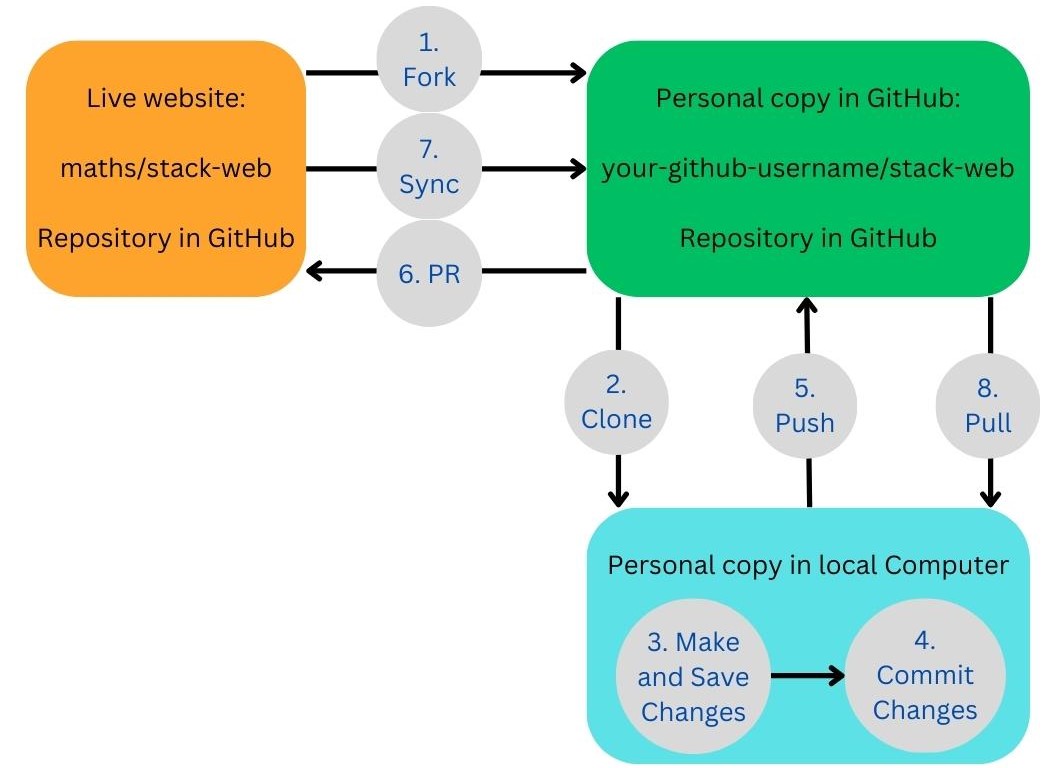
The following diagram summarises the steps to update the website:
Figure: Website update workflow diagram
Fork the maths/stack-web repository to create a copy of it in your own GitHub account.
Clone the your-github-username/stack-web repository to get a copy in your local computer.
Make and save the changes you would like to propose.
Commit your changes to update your repository in your local computer.
Push your commits to upload them into your GitHub repository.
Create a Pull request to request your changes to be reviewed and accepted by a colleague.
If others update the website while you are working on your Fork, it is recommended to sync these changes into your repository. This process consists of the following steps (full details will be added to this guide soon):
Sync the changes from the maths/stack-web repository into your your-github-username/stack-web repository.
Pull the changes into your local computer to keep working with the most up to date version of the website.
 STACK
STACK
 . This will open the "Create a new fork" page.
 .
. .
. .
. .
. . A "Copied!" message will temporarily appear.
 . A small window will appear at the top of the screen:

 . The number represents the number of files changed. Click on the Source Control icon to commit and push your changes as follows: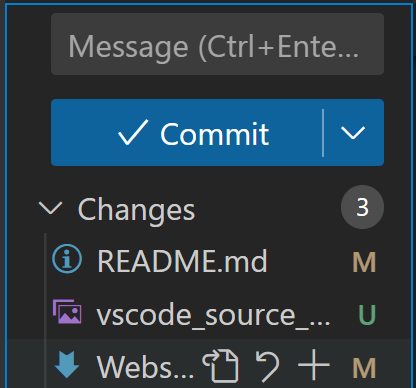
 .
. , and select "Push". This will update your GitHub repository with the changes you created.
 .
. . This will open the "Comparing changes" page and automatically draft the settings for the pull request, including all your pushed commits. The target (left hand side of the arrow) should be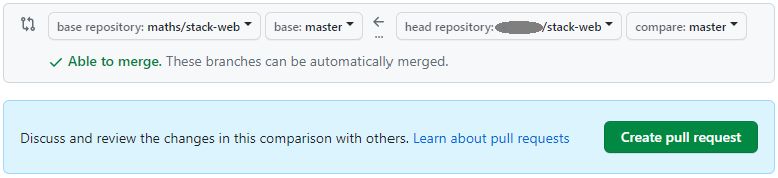
 . This will finish the process and a colleague with relevant permissions will review your pull request and either get back to you or merge it.